11 September 2023 , 16:00
1043
0
You're able to pick up a number of ships and add them to your inventory in Starfield, but how do you actually change which ship you have equipped?
Starfield may be all about adventuring and building outposts, and – all things considered – the game isn't much of a true open world due to the amount of fast travel you're likely to be using. So, because of that, how much actual space flight you do is really up to you. Despite that, you can collect a decent number of ships, either by buying them or channelling your inner space pirate and commandeering them from other people within the universe.
While you can get by with one ship alone without much issue, having multiple ships tailored to different uses can be useful. You can build a beast of a ship that will be nigh unstoppable in combat, while also having one focused on speed, and another aiming built to smuggle contraband.
Despite being something that should in theory be an easy thing, it can be a bit of a pain to figure out how to switch ships in Starfield. Thankfully it isn't too much of a hassle to do.
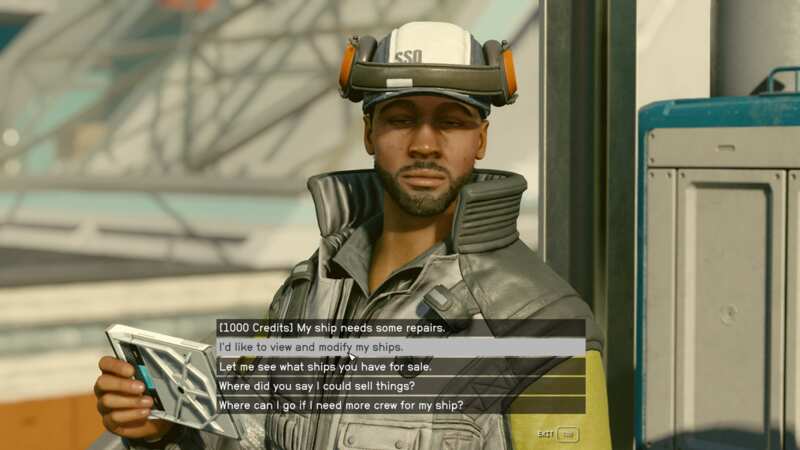
Switching ships in Starfield is fairly simple, you'll need to find a ship technician, these can be found at Shipyards across the universe. The first one you're likely to run into is right next to where you land in New Atlantis. Head over to the Trade Authority Kiosk and you'll find a ship technician right next to it. Keep in mind this is simply the first ship technician you'll find in the game and there are multiple technicians across the universe on planets like Volii Alpha and Akila, any of these will work.
 Why Star Wars Jedi: Survivor's six week delay is a good thing
Once you're talking to the ship technician select the option that says "I'd like to view and modify my ships". You'll be taken to a ship menu where you can view all of your ships. When you're looking at a ship you'll have an option in the bottom right to set a ship as your Home Ship, doing this is how you switch ships in Starfield.
You can also switch ships by hijacking a ship, once you start piloting it, it will become your default ship until you change it. This can be an issue if you've picked up a rubbish ship from an enemy, but at least now you know how to switch back.